Order Flow Trading for Beginners 02: Footprint Settings, Setups and Position Sizing
Order flow becomes tradable once the data, settings, levels and position size are fixed before the open.
Most traders who install a footprint chart after reading about order flow hit the same wall within a week, because the screen fills with constantly changing numbers, flashing red and green bars and nothing on it says which of those numbers deserve attention at any given moment.
The usual responses are to close the chart and go back to candlesticks, or to treat every highlighted imbalance as a signal and end up trading noise, and neither response says anything about whether order flow works.
The problem sits upstream of the chart, in decisions that belong before the session opens: whether the data feeding the footprint is complete, which settings stay fixed for the day, which prices are allowed to produce trades, and how many contracts a given stop justifies.
Once those decisions are settled, the live session shrinks to the few moments when price reaches a marked level and the footprint shows a pattern you have already written a rule for.
Everything below uses the E-mini S&P 500 (ES) as the working example, because CME tags the aggressor side of its trades, which makes ES data some of the most complete order flow data a retail trader can access, and builds on the reading skills from Part 1: the order book, the tape, footprint charts, delta and volume profile.
I. WHERE YOUR FOOTPRINT DATA COMES FROM
Every number on a footprint chart is only as reliable as the data path behind it, so the first piece of configuration happens before any chart is opened.
Trades the exchange leaves unflagged
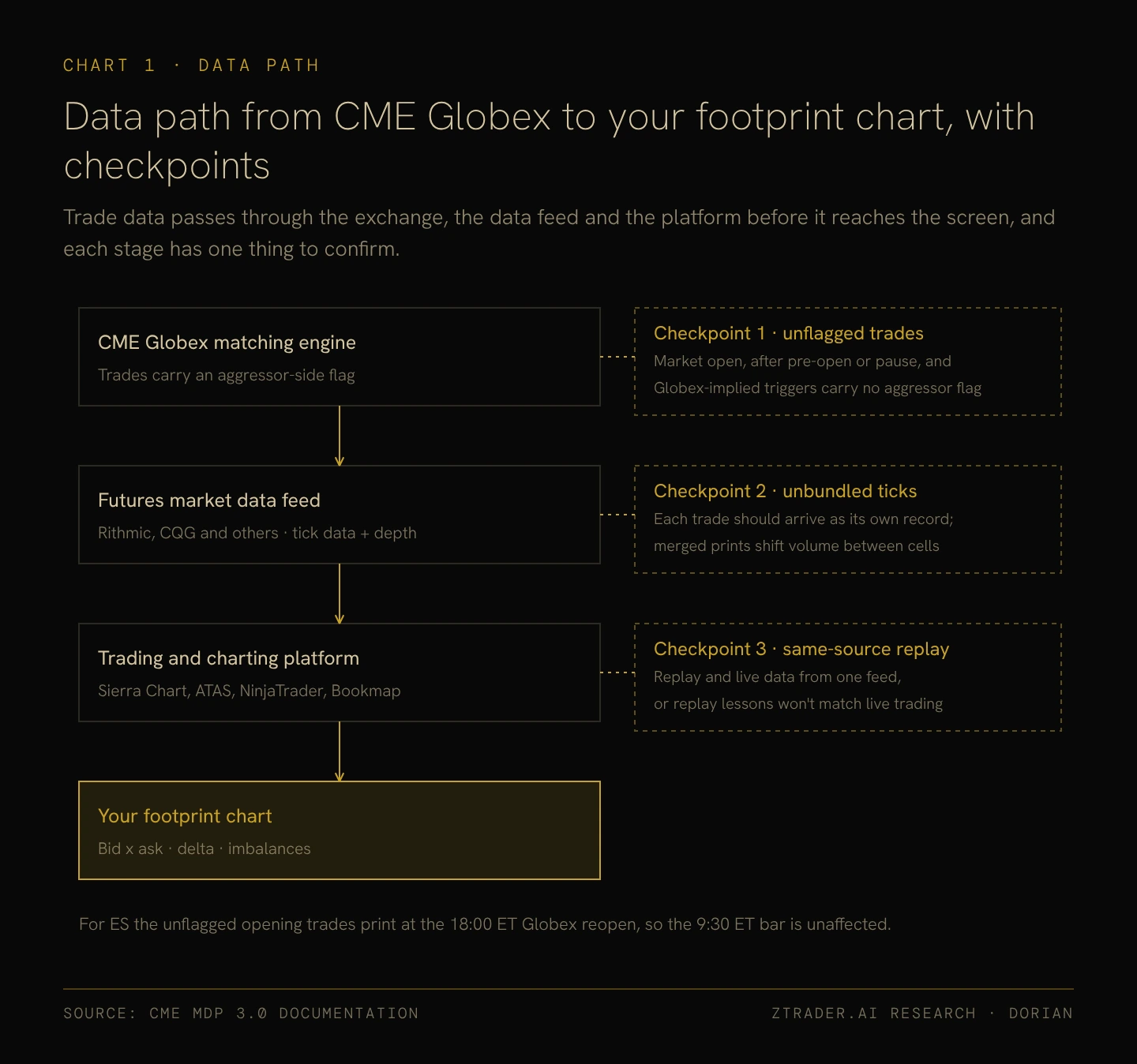
CME’s Globex matching engine marks trades with the side that crossed the spread, and that flag is how a footprint decides whether volume belongs in the bid column or the ask column.
The flag is missing for trades at the market open, for trades after a pre-open or a pause, and for trades triggered by an implied bid or offer that Globex generates itself, and platforms handle these unflagged trades in different ways.
For ES the market open in question is the 18:00 ET Globex reopen after the daily one-hour break, so the first bar of the overnight session and any bar that contains a trading pause deserve less weight, while the 9:30 ET start of regular trading hours happens during continuous trading and carries flagged trades as usual.
Unbundled ticks from the data feed
What are Rithmic and CQG?
They are the data pipes between the exchange and your trading platform. Instead of raw exchange data going straight to your screen, Rithmic and CQG process and stream every single market update down to your software.
In plain English:
If your data feed is garbage, your footprint chart is basically a lie.
Some cheap or lazy feeds try to save bandwidth by grouping multiple trades into a single bundled print. To your chart, that changes everything—it throws volume into the wrong cells, invents fake imbalances out of thin air, and erases real ones.
Before you drop money on order flow software, check with your broker or feed provider (like Rithmic or CQG) to make sure they are streaming every trade as its own standalone record, instead of merging prints behind your back.
Replay data from the same source
Most order flow platforms can replay past sessions, and the replay data has to come from the same feed as the live data, because a footprint that looks different on replay than it did live makes every lesson from replay practice unreliable.
II. WORKSPACE LAYOUT AND WHAT EACH WINDOW IS FOR
Once the data can be trusted, the next decision is how much screen space each tool gets, and the answer follows from which tool makes the decision and which tools only confirm it.
Footprint in the center
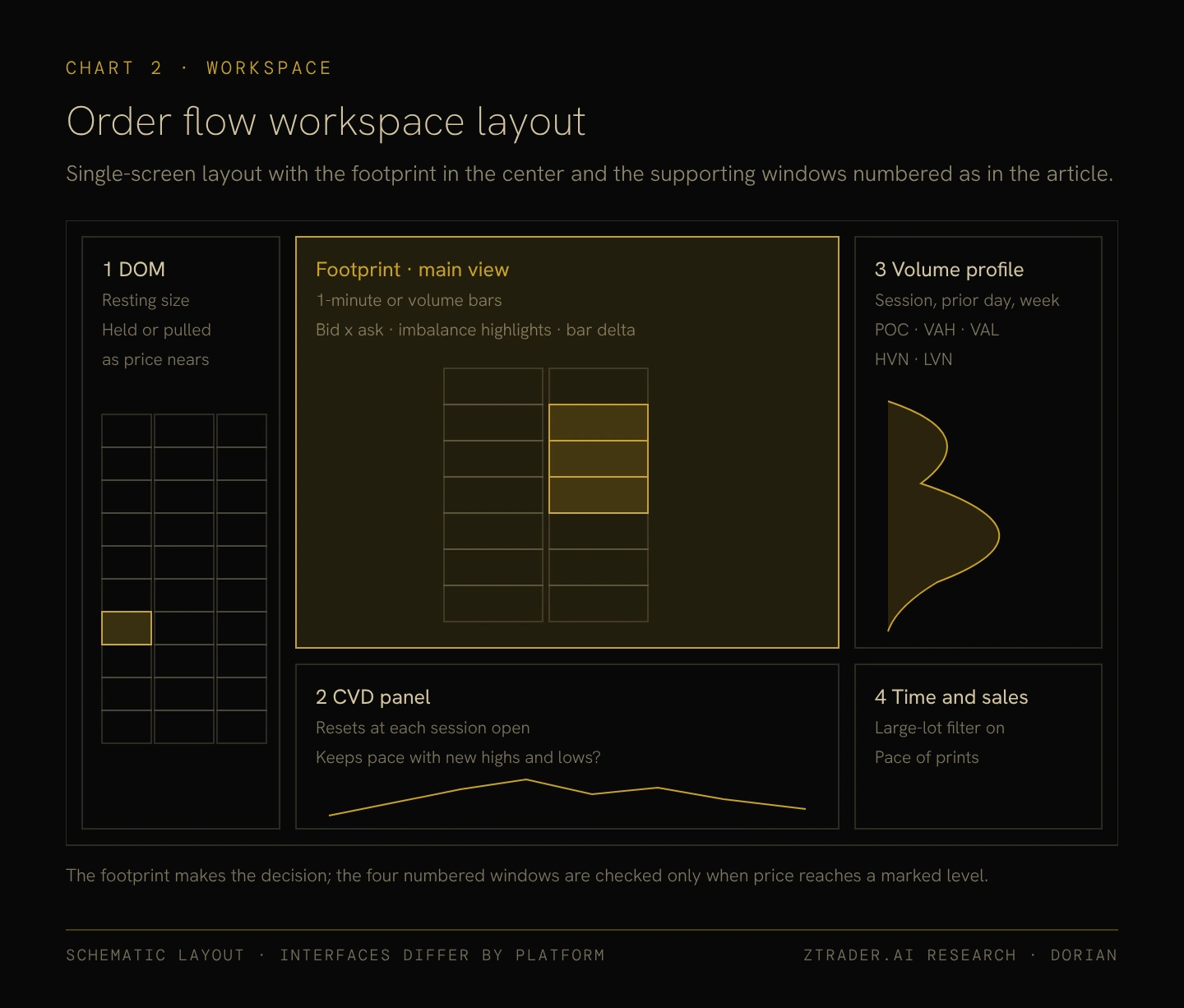
The footprint chart is where a trade gets decided, so it takes the center of the screen and the largest share of space, set to show bid x ask at each price, imbalance highlights and the delta of every bar.
Supporting windows
The other four windows only get checked when price reaches a marked level:
- The DOM, on the left, shows whether resting orders hold or get pulled as price approaches.
- The CVD panel, under the footprint, shows whether aggressive buying or selling keeps pace with new highs and new lows.
- Volume profile, on the right, shows where the current price sits relative to the POC, the value area and the volume nodes.
- Time and sales, in the lower right, shows how fast prints are arriving and, with a large-lot filter switched on, when big orders hit.
Large-order thresholds on the DOM and the tape should be set separately for each contract, since typical resting size differs widely between ES, NQ and CL.
III. FOOTPRINT SETTINGS, AND HOW TO CALIBRATE THEM ON TRADING REPLAY
With the layout in place, the settings inside the footprint decide how much of what appears on screen is signal, and platform defaults are rarely the right values for a particular contract.
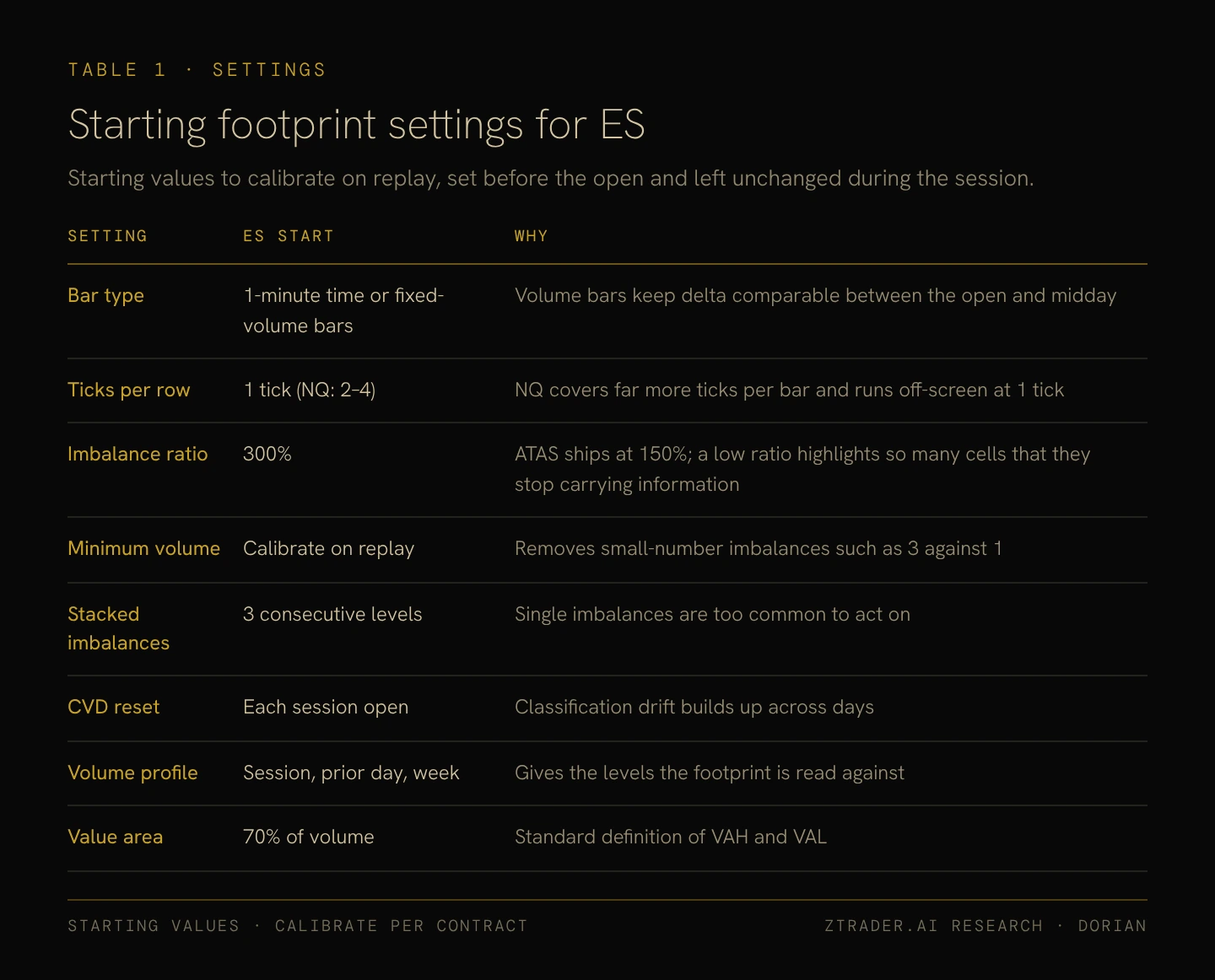
Starting values for ES
Table 1 lists starting values for ES with the reason for each one. Bars can be 1-minute time bars or fixed-volume bars, and volume bars have the advantage that each bar holds roughly the same number of contracts, which keeps delta comparable between the busy open and the quiet midday.
ES reads well at one tick per row, while NQ, which covers far more ticks in a typical bar, is often easier to read with 2 to 4 ticks combined into each row. The imbalance ratio starts at 300%, twice the 150% that ATAS ships with, because a low ratio highlights so many cells that the highlights stop carrying information.
Stacked imbalances count from three consecutive levels, CVD resets at each session open so that classification drift cannot build up across days, and the volume profile shows the current session, the prior session and the week, with the value area set at 70% of volume.
Calibrating on replay
Those values are a starting point, and four steps turn them into settings that fit your contract and your bar type:
- Replay at least a month of sessions, roughly 20 trading days, so the sample contains trend days as well as range days.
- Count the imbalance highlights in each session, then raise the ratio or the minimum-volume filter if most bars carry one, or lower them if almost none do.
- Set the minimum-volume filter high enough that small-number imbalances such as 3 contracts against 1 disappear, and check the result in both the busiest and the quietest hour of the session.
- Record the final settings in your trade journal and leave them unchanged until the next scheduled review, since adjusting settings during a session tends to produce exactly the signal you were hoping to see.
IV. LEVELS TO MARK BEFORE THE OPEN
Settings determine what the footprint can show, and the map determines where its readings count, because the same absorption means little in the middle of a range and a great deal at a level other participants are also watching.
Before the regular session opens at 9:30 ET, the levels to mark are the prior day’s POC, VAH and VAL, the overnight high and low from the Globex session, the weekly value area and any clear low volume nodes from recent profiles.
The initial balance, which is the range of the first hour of the regular session, adds two more references once it completes at 10:30 ET. Price trading away from these levels needs no footprint reading at all, which takes most of the session off the table and leaves your attention for the moments when price is at a level.
V. WHEN PRICE TRADES INTO A MARKED LEVEL
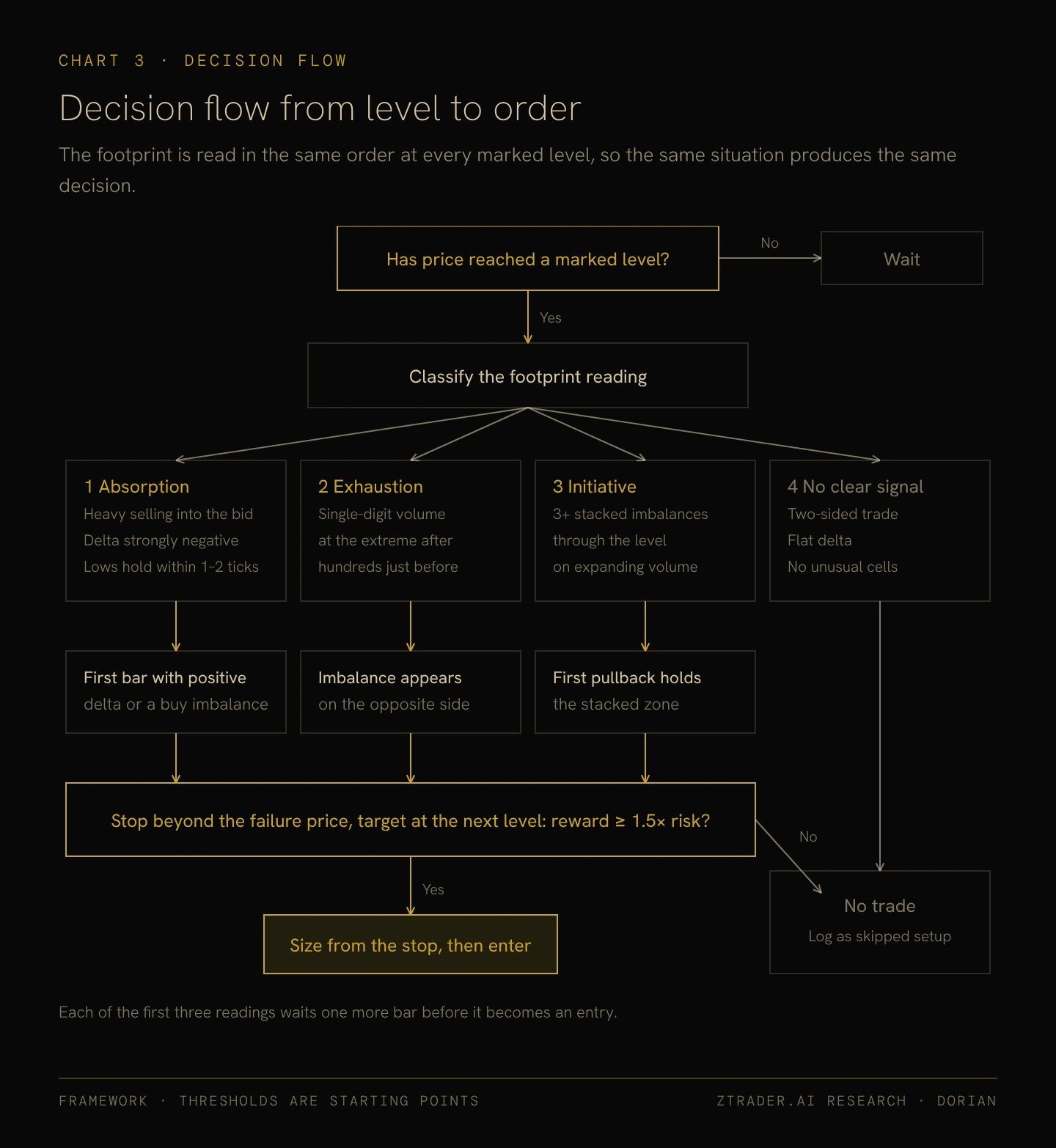
When price reaches one of those marked levels, the footprint gets read in a fixed order, so that the same situation produces the same decision every time.
Classifying the reading
Readings at a level fall into four cases:
- Absorption: heavy aggressive selling into the bid with strongly negative delta, while the lows hold within one or two ticks, which points to a passive buyer taking the other side.
- Exhaustion: at the end of an extended move, the extreme price shows single-digit volume on the aggressive side after hundreds of contracts traded at the levels just before it.
- Initiative: stacked imbalances across three or more levels pushing through the marked level on expanding volume.
- No clear signal: two-sided trade, flat delta and no unusual cells, which means no trade.
Waiting for MARKET confirmation
Each pattern needs one more bar before it becomes an entry. Absorption is confirmed by the first bar with positive delta or a buying imbalance above the absorbed level, exhaustion by an imbalance on the opposite side, and initiative by the first pullback holding the stacked imbalance zone.
Checking reward against risk
The final check comes once the stop and target are placed.
The stop goes beyond the price where the signal would be proven wrong and the target goes at the next level on the map, and if the distance to the target is less than 1.5 times the distance to the stop, the trade is skipped and logged as a skipped setup.
VI. ABSORPTION LONGS AND FAILED-BREAKOUT SHORTS
Most order flow trades at marked levels end up in one of two structures, and in both of them the signal decides where the stop belongs.
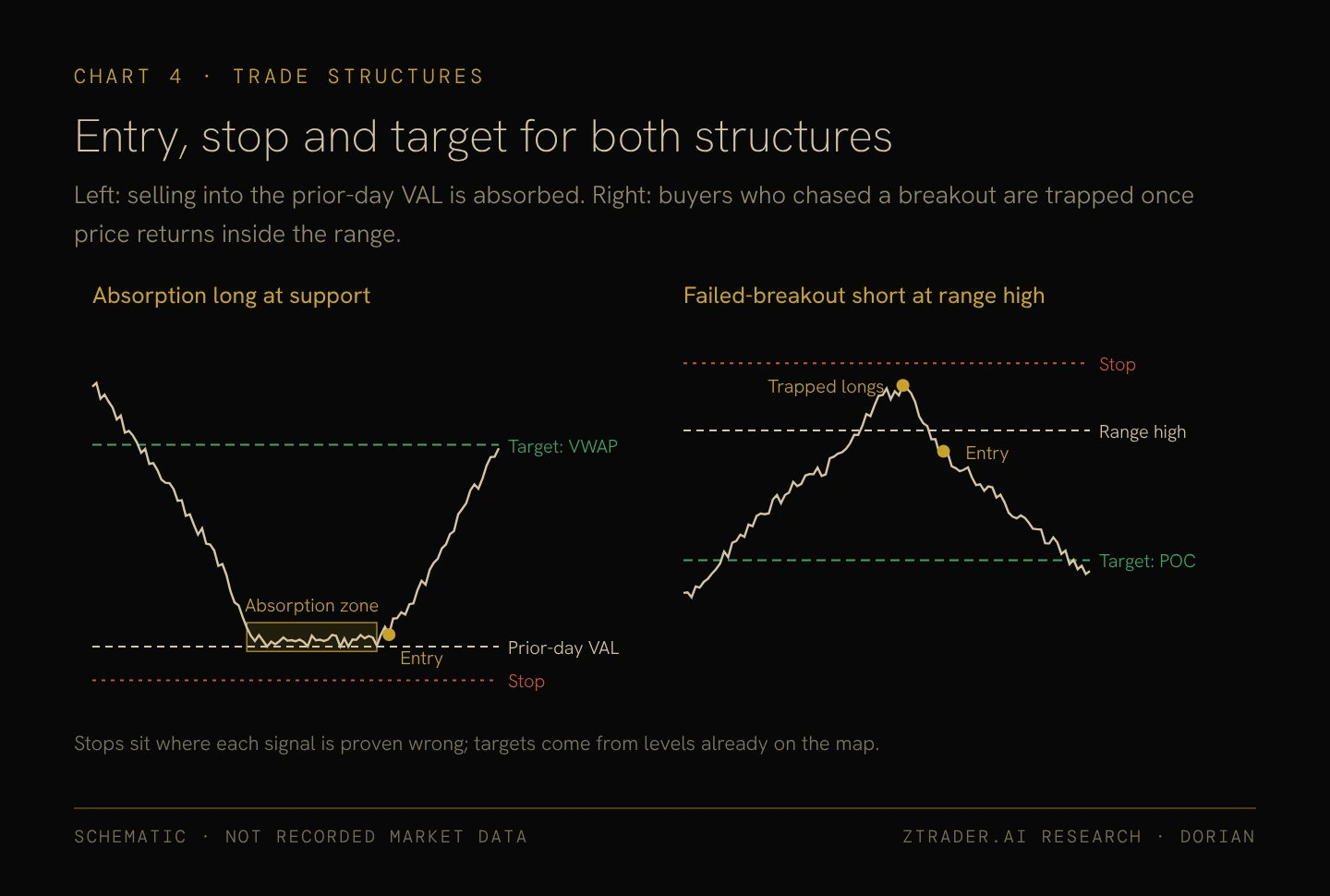
Absorption long at support
Sellers hammer down into a key level—like the prior day's VAL—the lows hold while delta keeps bleeding negative, and you pull the trigger as soon as the confirmation bar prints. Your stop goes just outside the absorption zone, usually 2 to 4 ticks past it, because if price actually smashes through the level the passive buyers were defending, your trade thesis is completely dead.
As for targets?
Look at the map: you're aiming straight for VWAP or the POC.
Failed-breakout short at the range high
Price rips above the range high, aggressive buyers chase it with heavy positive delta, and within a few bars, price snaps right back inside—leaving those chasers trapped holding underwater longs right at the highs.
You pull the trigger the second price curls back inside the range. Your stop goes just above the high of that failed breakout, and your first target is the POC dead center in the range, where those trapped buyers puking their positions will help grease the skids for your trade.
Flip the script and the exact same mechanics print a short setup below a range low.
VII. FROM TICK STOP TO CONTRACT COUNT
Because the stop comes from the signal, the number of contracts has to come from the stop, and the arithmetic is identical for every contract:
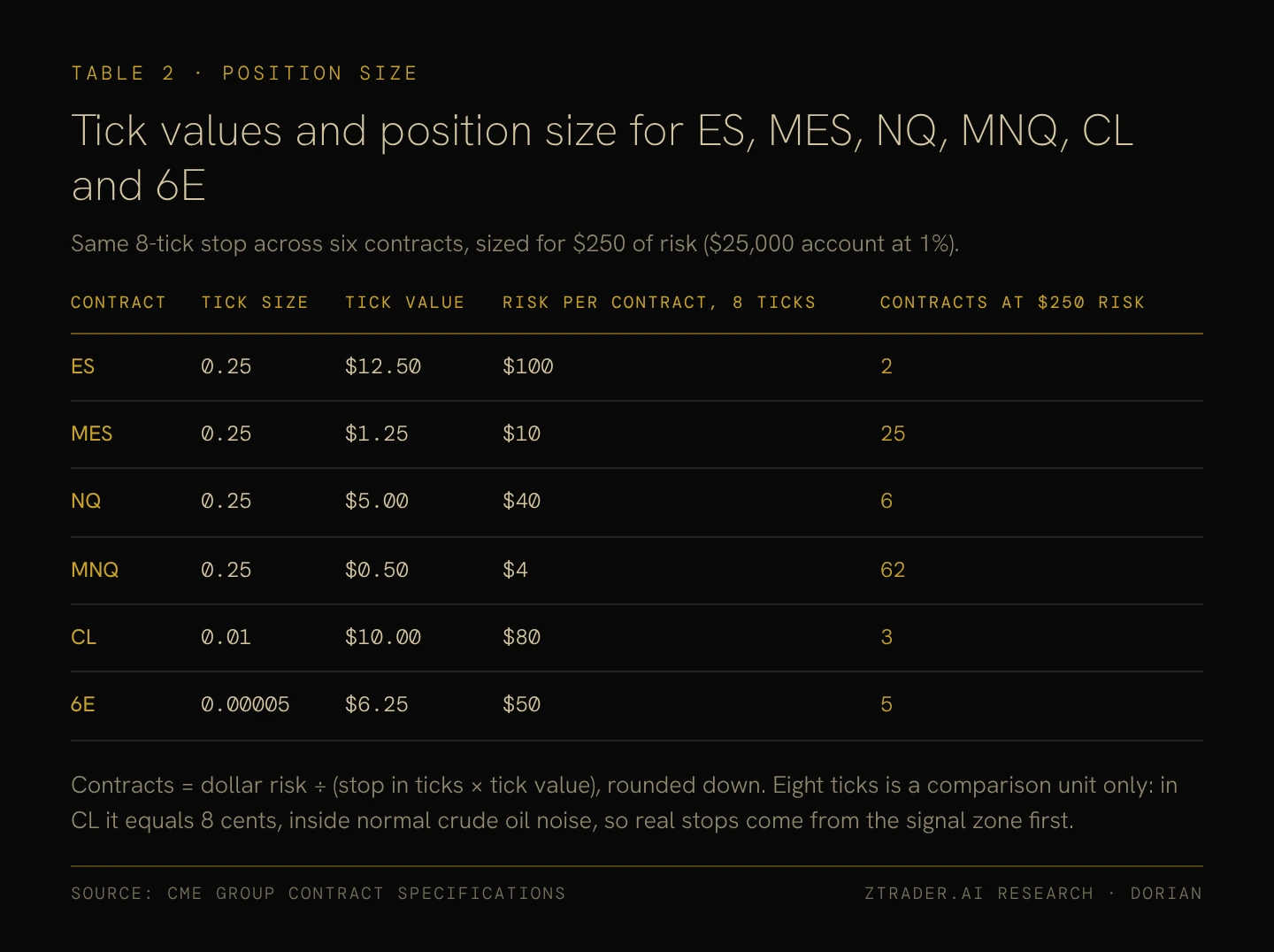
Contracts = dollar risk per trade ÷ (stop in ticks × tick value), rounded down.
On a $25,000 account risking 1% per trade, the dollar risk is $250.
ES moves $12.50 per tick, so an 8-tick stop risks $100 per contract and the formula allows 2 contracts. Micro E-mini S&P 500 (MES) moves $1.25 per tick, so the same stop risks $10 per contract and allows 25, which makes micro contracts the practical way to trade order flow on a small account without shrinking stops to fit the size.
Table 2 runs the same 8-tick stop across six contracts so that tick values can be compared side by side, although 8 ticks covers very different ground in different markets.
In CL it amounts to 8 cents, well inside the normal noise of crude oil, so real stops have to come from the width of the signal zone and the contract’s volatility before the formula is applied.
VIII. DAILY ROUTINE AND TRADE JOURNAL
Everything above becomes a method only when it is repeated in the same order every day and recorded in a form that can be counted.
The trading day in ET
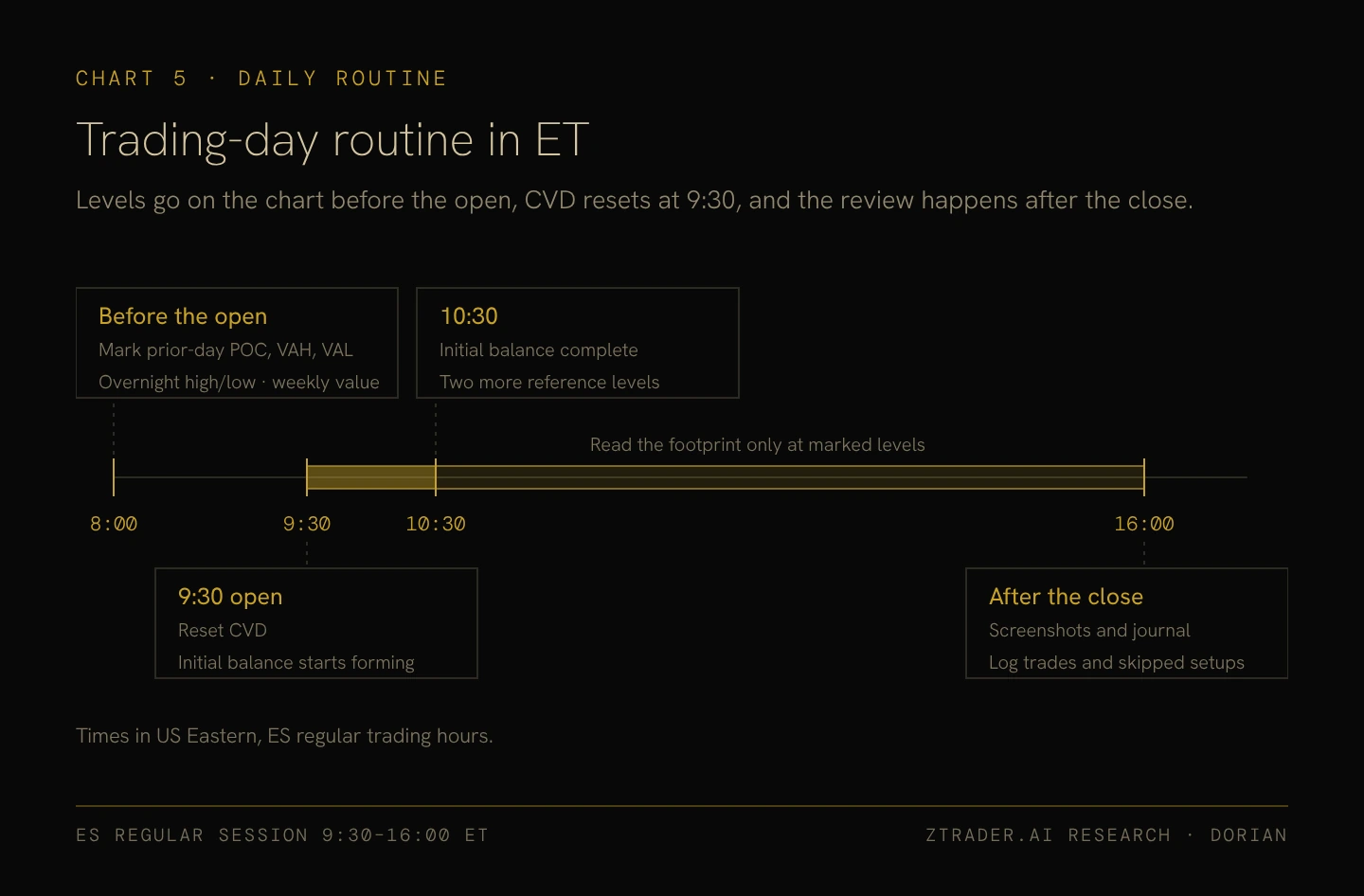
Levels go on the chart before 9:30 ET.
CVD resets at the 9:30 open, when the initial balance also starts forming, and from then until the 16:00 ET close of regular trading hours the footprint gets read only when price reaches a marked level. Screenshots and journal entries are done after the close.
What to log
Every trade and every skipped setup gets the same fields, listed in Table 3: the date and contract, the level type, the pattern, the footprint readings at entry such as bar delta and the number of stacked levels, the entry, stop and target, the planned reward-to-risk, and the result measured in R. R is the amount risked on the trade, so a winner that makes twice the risk is recorded as 2R and a full stop-out as minus 1R.
Reviewing by pattern
Results are useless until you group them. Once you’ve logged a few dozen trades, you sort them by pattern and level type, comparing win rates and average R.
If absorption at the prior day’s VAL prints positive R while exhaustion trades at the overnight high bleed money, you kill the second setup on sight.
Your skipped-setup log tells you real quick whether your risk-to-reward filter is actually protecting you or just throwing away winners.
Order flow stops being a guessing game and turns into a real edge because of the work you do when the market is closed: locking down clean tick data, calibrating your footprint settings on replay, marking your map ahead of time, waiting for that exact confirmation bar, sizing your risk strictly off the failure point, and brutalizing your results in review until only the high-probability setups survive.
Once those decisions are locked in before the open, the live session isn’t about scrambling or hoping.
It’s just about watching price hit a level, recognizing which of your pre-written rules belongs on the screen, and executing without hesitation.